Turning Constraints Into Structure
As the saying goes, “In the beginner’s mind there are many possibilities. In the master’s mind there’s one.” This can seem a bit self-congratulatory for those of us who are no longer beginners. But it holds a strong grain of truth: the more we learn, the more structure we develop around what we consider possible.
Said another way, many things will always be possible. Far fewer things are likely to be useful.
Making useful things can be difficult, and useful documentation is no exception. Something is useful to the degree that it satisfies needs.
To top it all off, planning something out so it can be perfectly useful from the start is a nearly impossible endeavor. Such a plan cannot help but almost always be wildly out of step with reality–and I’m tempted to say always. I’ve found it both easier and more productive to start with what needs most need satisfying first, and move forward. These needs can often surface as perceived negatives.
What are the things this document needs to do, and also not do? Answer those questions, and you have your structure. Then you can look for how to flip the negatives. These negative requirements can then shift from restrictions to foundations. Not a cage, but a frame.
For a writer this effort can be further complicated when, as in often the case, any information we have comes from a variety of different sources for different pruposes. As a visual representation, a pile of information something like this:

With a right outlook, this need not restrain us but can instead help guide us. Here’s a specific example.
DynamoDB docs: conflict and structure
When I was working at AWS for the service DynamoDB, we came across some issues. High negatives in some pages. Experienced engineers coming to pages that didn’t have the information they needed, and complaining about it. The information was in the overall documentation…just not where they were looking. A reflexive response would be to try to improve search, and in the meantime have customer service just close the tickets as user errors.
A slightly better response could begin with adding that information to those pages. But that would have made the pages too dense for DynamoDB’s less technical audience: the business owners, project managers, stakeholders, and PMs who actually performed most of the purchasing. The people who were evaluating the service for their ventures.
But certainly developer use was key to the whole experience once businesses had engaged with us. This was what their business success could be riding on. So we needed to make sure developers could get the information they needed, when or before they needed it.
To satisfy these different needs, we had high level overview docs and separate reference information that could go all the way down in the weeds. These reference docs, full API guides and troubleshooting docs, were where we guided developers.
The difficulty was surfacing information that would head off trouble for the developers, in ways that wouldn’t put off less technical users. No one looking for a solution wants a wall of text; and certainly no customer wants to push through a wall of detail they don’t need in order to make a high level determination of what they do need.
The needs and the flip
The needs were:
- not alienating either audience
- surfacing specific information even if that same information was already buried deep in reference docs
- solving for troubleshooting in specifics, by making it easier to get developers the information they needed before it became a problem. Ideally, setting them up by understanding their search behavior, and presenting them just the information they would need to not get a point of troubleshooting in the first place.
Here’s how I flipped them:
- The first requirement, not alienating either audience, led towards creating new documentation that would fit developer’s needs without blocking non-developers’ reading.
- To specifically fulfill the last part, it would have to be defined in a way that non-developers wouldn’t feel compelled to read it.
- The second requirement led towards creating this new documentation as entirely separate from both overall information and existing reference documentation.
- The third requirement led towards creating a doc listing only initial information.
My solution: create a cheat sheet.
Fulfilling the first flipped requirement led towards specifically naming this doc a cheat sheet. It explains exactly what it is quickly and cleanly.
Fulfilling the second flipped need meant linking it clearly and visibly, at high level. The main page was updated with a separate link straight to the cheat sheet, and its own clear URL. Easily bookmarkable, easily shareable, and presented in the interface as an immediate decision point.
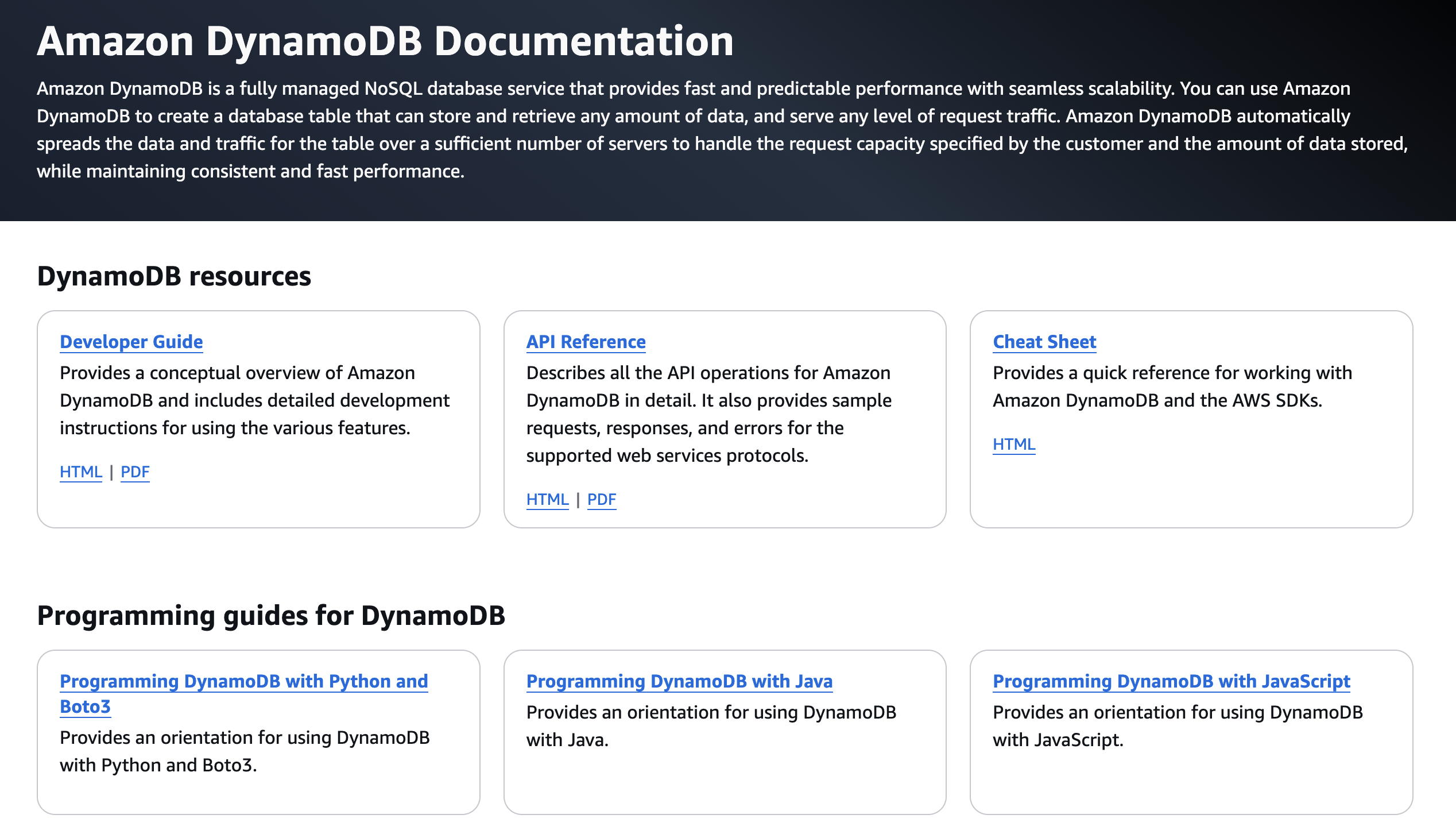
Any new engineer specifically coming to the site once they’ve been told to start working, could see it easily and it would provide them with the structure they needed to set things up right. Their own structure, for their own creativity to then be solidly supported by and for them to move forward with as a tool.
And fulfilling the third requirement meant providing the information developers had most searched for, first. The high-level requirements that they would need, and key gotchas to be aware of, when first setting up a DynamoDB instance.
The resulting DynamoDB cheat sheet: https://docs.aws.amazon.com/amazondynamodb/latest/developerguide/CheatSheet.html
This rapidly become one of the most visited pages on the site.
From fish heads to sauce
This is the technical writer’s work: something not useful into something that can be. This is our challenge, our skill, and our opportunity.
This work of selection can get you to something that is, as a visual representation, more like this.

As a separate example of turning something strange into something useful, see how this song turns the topic of fish heads into fun.
This post is part of Per the Docs, a monthly collaborative series where technical writers explore different aspects of our craft. Each month features a new topic, with perspectives from writers across the community. This month’s theme is: Content Alchemy.
- Previous article: Cody Anthony – Where the Script Stops and the Judgment Starts
- Next article: Jill Shaheen – Every bucket has a bottom
Full list of participants and articles: Per the Docs.
Disclaimer: Each article in this series is written and owned by its respective author. The views, opinions, and experiences shared belong solely to the individual writer and do not represent the perspectives of other participants or their employers (past or present).